
Skip to content
Information Technology

Enter a Search Term

Information Technology
  • Rutgers.edu
  • Alerts
  • IT Help Portal
  • Tech Guides
Information Technology
  • Locations
    • Rutgers–Camden IT
    • Rutgers–New Brunswick IT
    • Rutgers–Newark IT
    • Health Sciences IT
  • Services
    • All services
    • Getting started with IT
    • IT security
    • Research Computing
    • Teach with technology
  • Get Help
    • Support & hours
    • How-to and help articles
    • Rutgers IT Help portal
    • Report a security incident
  • About
    • About Rutgers IT
    • Office of the CIO
    • Office of Information Technology
    • Distributed IT
    • Policies
    • Strategic priorities
    • Contact Us
  • I want to...
    • Access DocuSign
    • Buy a computer or other tech
    • Contact the Help Desk
    • Connect to Wi-Fi
    • Create forms and surveys
    • Download Microsoft 365
    • Find a computing lab
    • Get Adobe Creative Cloud
    • Get a Grammarly account
    • Get software
    • Get started with research computing
    • Manage my NetID
    • Print on campus
    • Report a security incident
    • Reset my NetID password
    • Secure my technology
    • Set up two-step login with Duo
    • Teach with technology
    • View tech guides
  • Log in to...
    • Box file storage
    • Canvas
    • LabArchives
    • LinkedIn Learning
    • myRutgers portal
    • Qualtrics survey tool
    • REDCap
    • Rutgers Connect
    • ScarletMail
    • University software portal
    • Virtual Computer Labs
    • Webex
    • Zoom
  • IT Community
    • Committees and working groups
    • IT annual review
    • IT communications resources
    • IT community hub
    • IT email lists
    • IT Leadership Council
    • Policies
    • Slack for Rutgers IT
    • Strategic priorities
Information Technology
  • Locations
    • Rutgers–Camden IT
    • Rutgers–New Brunswick IT
    • Rutgers–Newark IT
    • Health Sciences IT
  • Services
    • All services
    • Getting started with IT
    • IT security
    • Research Computing
    • Teach with technology
  • Get Help
    • Support & hours
    • How-to and help articles
    • Rutgers IT Help portal
    • Report a security incident
  • About
    • About Rutgers IT
    • Office of the CIO
    • Office of Information Technology
    • Distributed IT
    • Policies
    • Strategic priorities
    • Contact Us
  • I want to...
    • Access DocuSign
    • Buy a computer or other tech
    • Contact the Help Desk
    • Connect to Wi-Fi
    • Create forms and surveys
    • Download Microsoft 365
    • Find a computing lab
    • Get Adobe Creative Cloud
    • Get a Grammarly account
    • Get software
    • Get started with research computing
    • Manage my NetID
    • Print on campus
    • Report a security incident
    • Reset my NetID password
    • Secure my technology
    • Set up two-step login with Duo
    • Teach with technology
    • View tech guides
  • Log in to...
    • Box file storage
    • Canvas
    • LabArchives
    • LinkedIn Learning
    • myRutgers portal
    • Qualtrics survey tool
    • REDCap
    • Rutgers Connect
    • ScarletMail
    • University software portal
    • Virtual Computer Labs
    • Webex
    • Zoom
  • IT Community
    • Committees and working groups
    • IT annual review
    • IT communications resources
    • IT community hub
    • IT email lists
    • IT Leadership Council
    • Policies
    • Slack for Rutgers IT
    • Strategic priorities
  • Rutgers.edu
  • Alerts
  • IT Help Portal
  • Tech Guides
News
Announcements
Apps and Tools
DO NOT USE
Events
Information Security
Initiatives and Projects
IT Community
Office of the CIO
Research Computing
Services and Support
Staff Spotlight
Teaching and Learning
Tips and Advice
Information Security

How to stay cyber secure during tax season

By

Alberta J. McAleavey

Date

April 15, 2020

While the federal income tax deadline for filing and payments has been extended automatically this year to July 15, 2020 due to the COVID-19 pandemic, it is still tax season, which means now more than ever, it is essential to protect your personal information, especially as you retrieve and fill out online forms. While identity theft and internet scams can occur at any point, the amount of sensitive information being shared online increases during times like this allowing cybercriminals to access your stuff.

According to the Treasury Inspector General for Tax Administration’s Semiannual Report to Congress, over 2.4 million Americans were victims of scams in 2018, most commonly by phone and email. Although the digital age has made it virtually impossible to avoid the presence of personal information online, there are many ways to protect yourself from cybercrime. Following these tips can help keep your information safe during tax season.

Create unique, strong passwords.
To prevent hackers from accessing your personal accounts, update your password so that it is long, difficult to guess, and includes letters, numbers and symbols, especially for any financial sites such as online banking accounts. It’s important to change your passwords regularly and only use secure methods of storing your passwords.

Enable multi-factor authentication.
Using multi-factor authentication for your personal accounts increases account security. With multi-factor authentication, you’re required to provide another form of identification, such as a passcode provided by email or text, to verify your identity. This is beneficial not only for financial accounts, but for social media, email or any accounts containing personal information. You can start by signing up for two-step login with Duo, a two-factor authentication platform, to protect your Rutgers accounts.

Keep your social security number safe.
Since the IRS uses social security numbers to identify taxpayers, keep your card home in a safe place and never share your number via email or phone.

Be protected with antivirus software.
Using antivirus software blocks hackers from accessing your information. To better protect your devices, check out the antivirus software options offered to Rutgers faculty, staff and students for both university-owned and personal equipment.

Be aware of phishing.
Phishing is the fraudulent practice of attempting to obtain someone’s personal information by appearing as a legitimate source through online communication. Most companies, especially accounting firms, won’t ask you to supply personal or financial information through an unfamiliar form.

How to report tax scams and fraudulent schemes.

IRS: It is important to note that the IRS does not initiate contact with taxpayers via text message, email or social media channels to request financial and/or personal information. To report suspected scams, visit the IRS website to review established reporting protocols. You can also reach out to the Treasury Inspector General for Tax Administration at 800-366-4484.

University: It is important to learn how different departments will interact with you relative to your personal or financial information. For example, you will not be asked to provide your Social Security Number via email to get assistance from Human Resources or Payroll. Also, W2 form requests are managed via the University portal – myRutgers Portal.  When in doubt, verify!

Report suspected scams to abuse@rutgers.edu, as well as to your manager or Dean.

Below is an example of an actual phishing scam received by university staff members in the past.
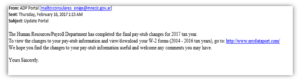
Phishing email example during tax season

Tags: antivirus, security, two-step login
Rutgers logo
  • Universitywide
  • Rutgers University—New Brunswick
  • Rutgers University—Newark
  • Rutgers University—Camden
  • Rutgers Health
  • Search Rutgers

Explore Rutgers IT

  • Annual review
  • Latest news
  • IT Security
  • myRutgers portal
  • Research Computing
  • Software portal

Rutgers IT News

  • Infographic: Bring the Rutgers computer labs to you
  • Same tool, new name: NotebookLM is now Gemini Notebook
  • RU ready for Fall? New semester, new tech
  • App-y fall: Productivity tools at Rutgers to maximize your semester
  • Avoid the textbook trap: Textbook scams 101

Tech Guides

  • Student Tech Guide
  • Faculty Tech Guide
  • Staff Tech Guide

About

  • About Rutgers IT
  • Office of the Chief Information Officer
  • Office of Information Technology
  • Distributed IT
  • Policies
  • Strategic Priorities for Rutgers IT
  • Contact Us

Feedback

  • Submit your comments, suggestions, and other feedback about IT at Rutgers.

Follow Us

Rutgers is an equal access/equal opportunity institution. Individuals with disabilities are encouraged to direct suggestions, comments, or complaints concerning any accessibility issues with Rutgers websites to accessibility@rutgers.edu or complete the Report Accessibility Barrier / Provide Feedback form.

Copyright ©2026, Rutgers, The State University of New Jersey. All rights reserved. Contact webmaster