Aria landmarks
ARIA landmarks
Web A11y Checklist
- Overview
- Where do I start?
- Build structure/content
- Provide alternative means of accessing information
- Use color appropriately
- Make tables/docs accessible
Many screen reader users navigate your site through landmarks, which are “regions” that you have created on your page. You can achieve this by using a combination of HTML5 and ARIA labels. ARIA is used to provide instructions to assistive technology, letting them how to identify, read out, or interact with an element on the page.
Appropriate use
It is recommended that you start with using HTML 5 semantic regions. These are the following:
<header>, <nav>, <main>, <section>, <aside>, <footer>
These should correspond to the regions on your page:
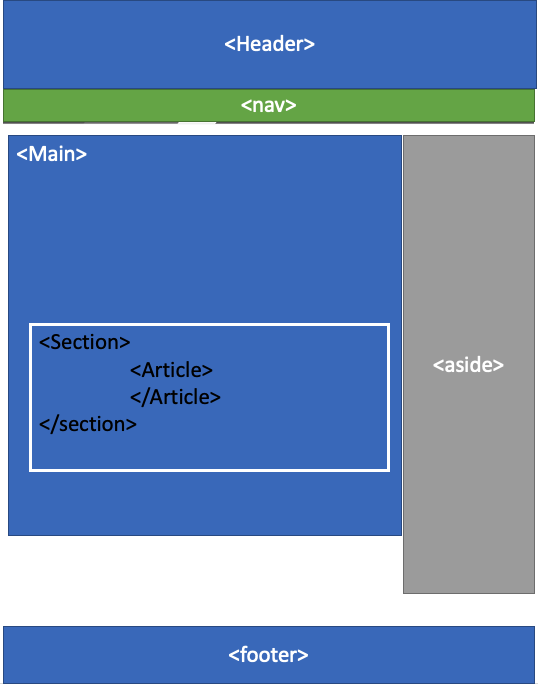
It is common for you to have multiple navigation, sections, and sometimes side items. For these it’s important that you are providing a usable label so that the end user can discern one element from the other.
In the example below we’ve coded two navigation items:
<nav aria-label="Main Navigation"> ... </nav>
...
<nav aria-label="Book Chapters"> ... </nav>
How to test for compliance
We recommend using the Skip to Headings browser extension on Google Chrome. This will allow you to visually see the landmark structures on your page.
Common mistakes
Not labeling landmarks: A very common mistake we see is not providing an ARIA label to your sections. This results in the screen reader listing:
- Navigation
- Navigation
- Complimentary Region
- Complimentary Region
- Complimentary Region
This does not provide any usable information that allows the user to navigate your site.